
Notes Feature for E-Commerce Tool
Role
Product Designer
Team
1 Product Manager, 1 Scrum Masters, 2 Quality Engineers, and 7 Software Engineers who were divided between the United States and India.
Timeline
10 weeks
Problem
Lack of reason codes and ability to add additional notes and context, led to poor documentation and visibility when editing the e-commerce sellable status of an item.
Solution
Design the Notes Feature when creating add overrides to give more control and visibility.
Key Activities
User research, wireframing, prototyping, UI design, usability testing, product release
OUTCOME
I lead and designed the Notes Feature Release, giving Digital Merchandisers more control and visibility when managing their e-commerce sellable status of an unplanned item.

Creating a new notes feature can be found directly on the Add Overrides page.

Notes can be viewed in the table via notes symbols. Users can also add a note through the link in the table as well.
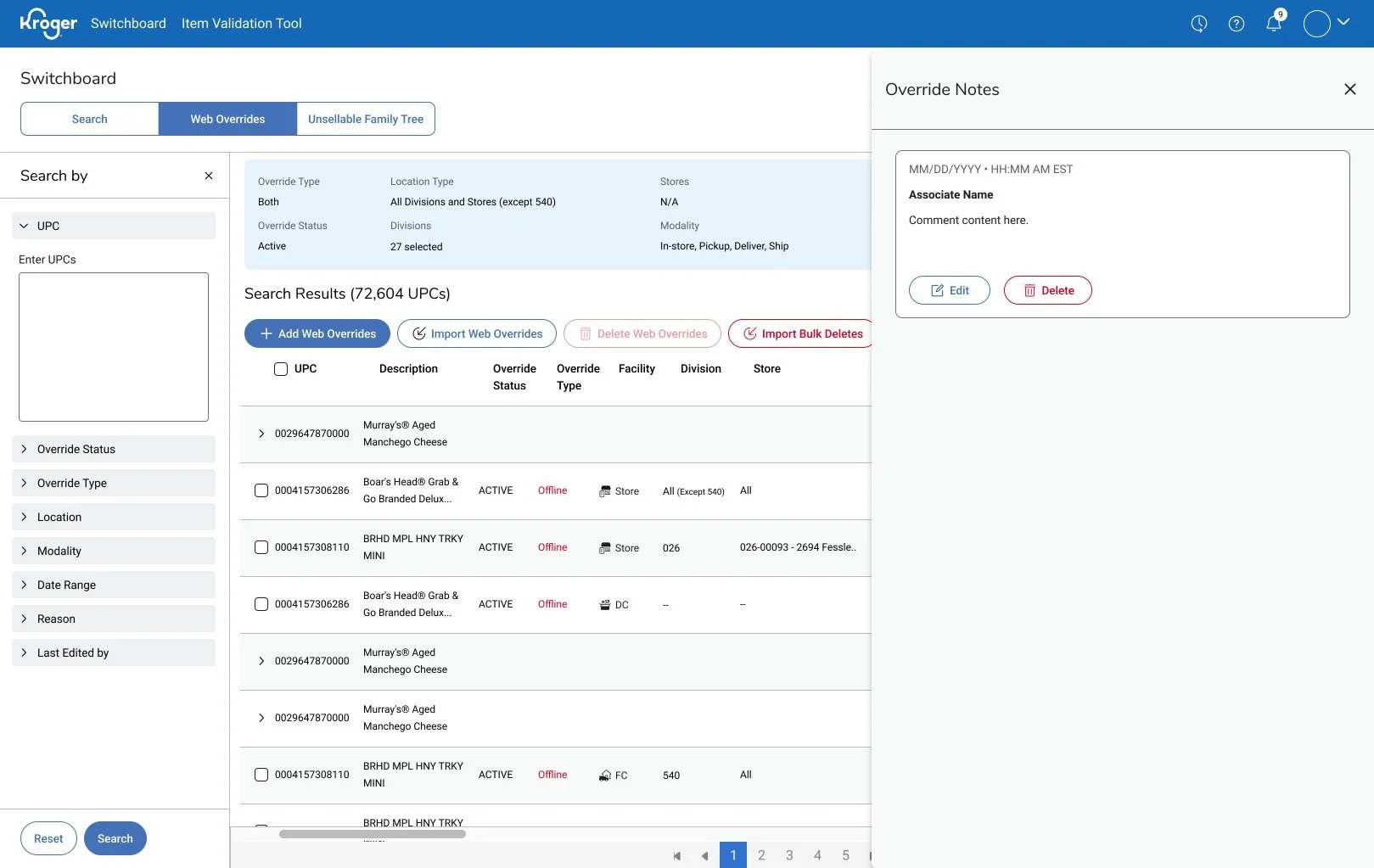
Notes are accessed and managed through the side panel.

Users are able to edit a note via edit modal.
BACKGROUND & CONTEXT
Kroger’s Digital Merchandisers make over 500 updates per month on their products and items, which can lead to confusion and redundant work if the changes were not documented properly.
This gap in highlights a critical need: enable users a way to provide more detailed information when creating an override.
This will help bring clarity and reduce guesswork for everyone who uses Switchboard to manage and understand their products.

IDEATION & CONCEPT DEVELOPMENT
Analysis of Kroger Internal Tools
I worked with designers and our users to align and establish a consistent experience between tools.

Potential User Flows
I also mapped out flows to illustrate the steps a user would take to accomplish the different tasks involved with Override Notes (creating, viewing, editing, deleting).

Wireframes and Mock ups
I drafted low-fidelity wireframes to visualize where and how the notes functionality will appear within the current interface.


TESTING & ITERATING
I used low-fidelity wireframes for user testing and the feedback and notes from my observations were used for design iterations.
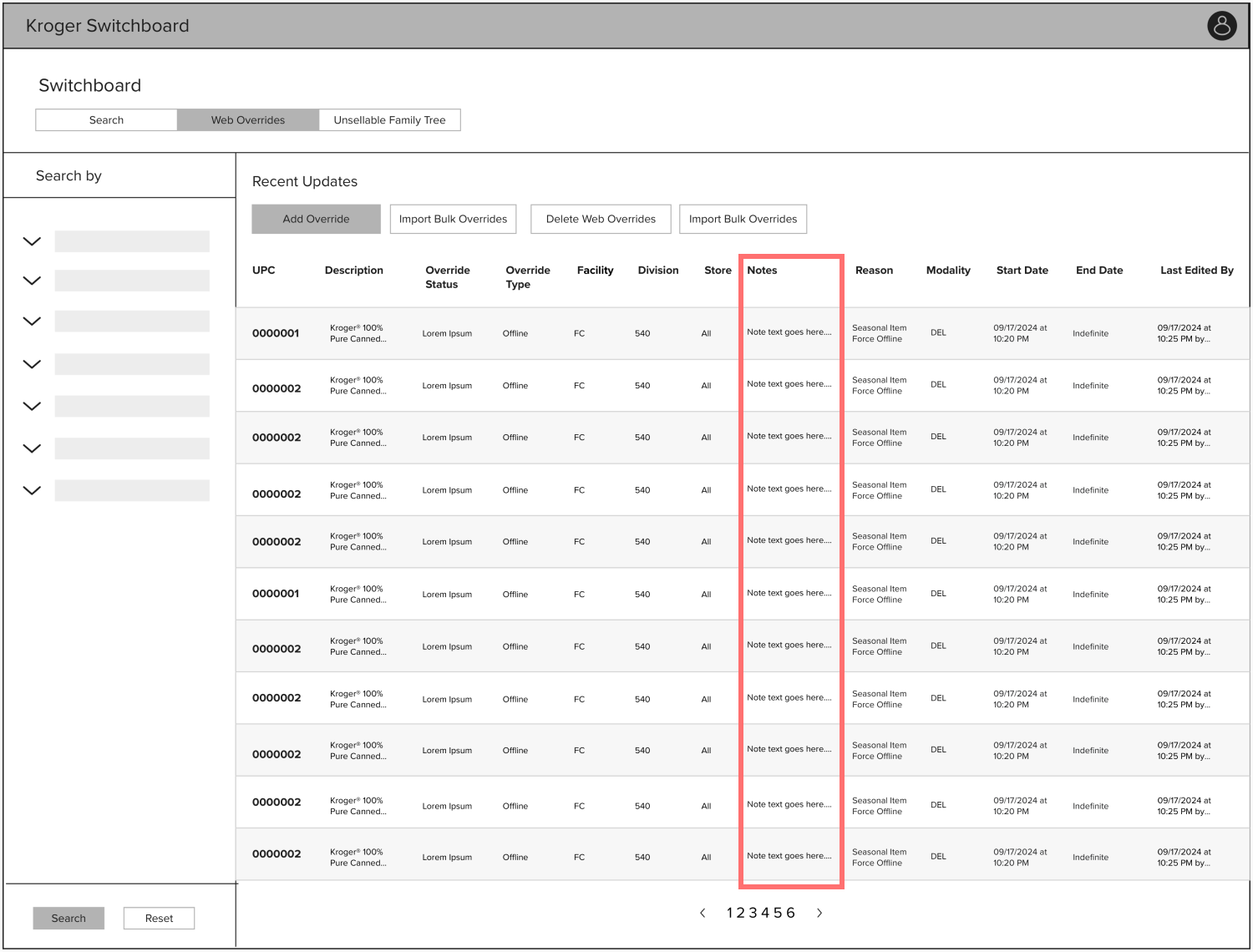
Update 1: Use note symbol and column position in table
Before

After

To save space and improve clarity, I replaced note text in the table with an icon and moved the column to the far right as notes are supplementary to the primary workflow data.
Update 2: Change notes details page from modal to side bar.
Before
After

After sharing early designs with other pillar designers, I learned many of their tools used a sidebar for details.
To maintain a consistent user experience across Kroger’s tools, I implemented a sidebar for displaying notes.
FINAL DESIGN & RESULTS
The result was a simple yet powerful solution that empowered Kroger’s Digital Merchandisers to better oversee and manage the e-commerce sellable status of unplanned items."


After one month of production:
Notes feature was adopted by 62% of users
48,112 web overrides with notes were created
Next steps:
Our team was excited to see the success of this feature enhancement release to our users! Some future roadmap items that we brainstormed to continue building onto the Notes feature are
Currently, Notes are available for Web Overrides, which manage products at an item level. Our roadmap includes expanding this capability to allow users managing products at a category level to create notes for their workflows as well.
With the current release, only one note can be taken and recorded at a time. We aim to enhance this functionality by evolving the notes feature into a commenting system, enabling users to engage in back-and-forth communication.